
ICT26 Digital Humanism / Details of Chapters (Full Proposal)
1. Submission of full proposals -I. General information
- All proposals must be submitted electronically via the WWTF’s Funding Portal. The Funding Portal will automatically save your entries and changes. You can pause data entry at any time. All information will be available again upon your next login.
- All core team members (i.e., coordinating PI and co-PIs) can contribute to and edit the proposal before its submission. However, only one person can edit the proposal in the Funding Portal at any time.
- Please go to the User Guide Funding Portal for all general matters, e.g. regarding creating your profile, roles, CVs, etc.
- All sections of the proposal must be written in English.
- The length of the proposal is determined by character counts (including spaces) and page limits in case of uploads in the Funding Portal.
- The full proposal will be assessed by experts in the specific topics of the proposal. These experts will provide written assessments for the jury panel, whose collective expertise covers a range of topics in this call.
Please write the full proposal in a way that allows assessment by both expert reviewers and a broad high-level jury panel.
Overview of the full proposal phase
- Deadline for submission of full proposals: July 30, 2026, 2pm CET
- The reviewing by external experts commences in August
- Meeting of jury panel to select projects for funding: Late November 2026
- Funding decision of WWTF's Board of Directors: December 2026
- Announcement of Results: December 18, 2026.
Please note that only the coordinating PI (PI&C) can submit the proposal.
2. Accessing your proposal
- Go to https://fundingportal.wwtf.at/
- Login with your credentials
- You will see an overview of your proposal(s) and role(s) under the menu “My Proposals & Roles"
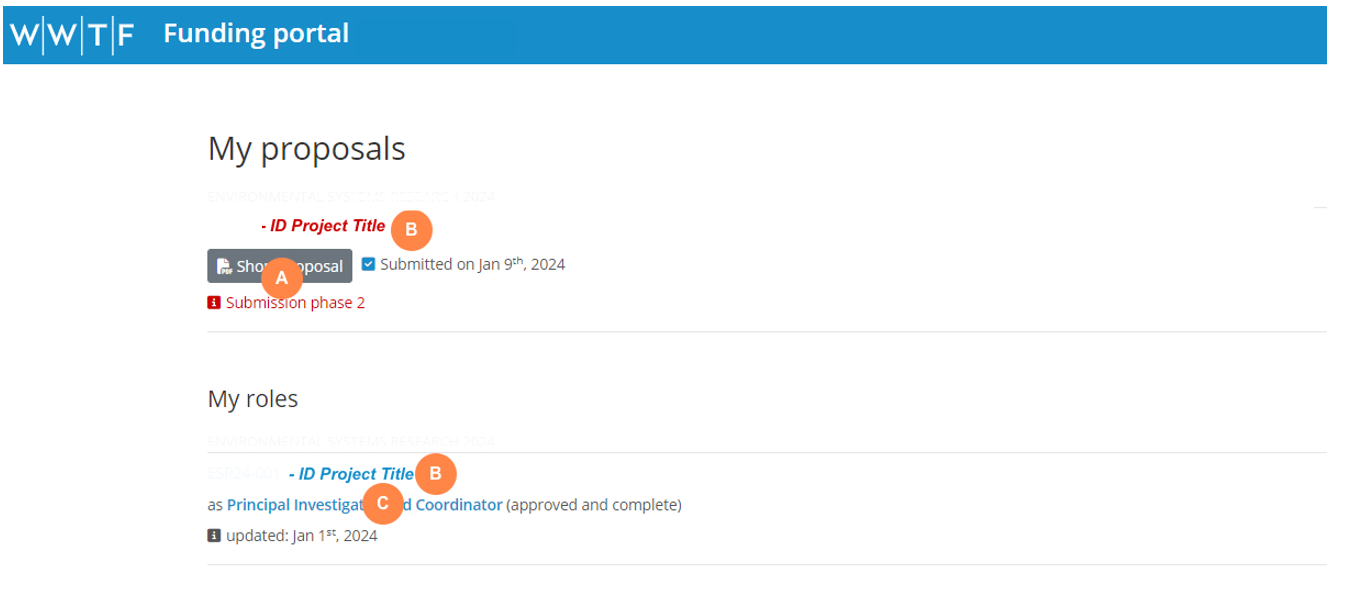
- A Click on “Short Proposal” to download a PDF of your submitted short proposal
- B Click on the project title to edit the full proposal
- C Click on your role to edit your specific role in this proposal
Chapter "Basic Information"
This chapter contains basicUpdate information about PIs
Contact details, CV, and information about your role in the proposal,project includinghave title,been automatically transferred from the short proposal to the full proposal. Please ensure the information in the tab "My Profile" and "My Roles" is up-to-date. Only update information if required.
Step 1: Update your profile information if required
Upon login, go to “My Profile” in the top menu to update your profile. To update your CV, delete the previous document and upload a new CV as PDF. The requirements regarding the CV in the full proposal are the same as those in the short proposal . Please review these requirements here.
Step 2: Update information about your specific role in the proposal if relevant
Go to “My Proposal & Roles” in the top menu. Under “My Roles”, click on your role below the title of the proposal.
You can update the personal information by clicking on “Refresh from profile”. The system will check if there is new information in “My Profile” and update this section accordingly. Should you have uploaded a new CV in "My Profile", it will now be transferred to the full proposal.
The requirements regarding the description of your specific role in the full proposal are the same as those in the short proposal. Please review these requirements here.
Please note that the information entered here should be specific to the project. If you are participating in multiple proposals that require different subsets of your expertise, please tailor the information according to the project.
II. Proposal Chapters
General Information
The full proposal is comprised of six chapters, each under a separate tab:
Budget Signatures
A chapter with a red alert symbol indicates that it is incomplete. Within the marked chapter, click on the red symbol(s) beside individual sections to highlight the fields requiring attention. A green checkmark indicates that the information in the chapter is complete.
Please note that the symbols might not refresh immediately even if the information in the chapter is complete. Changing to another chapter and going back to the other will refresh the symbol.
Chapter Basic Information
The name, acronym, nominated scientific disciplinesdisciplines, involved,project keywords, duration,duration and type of project (i.e., regular WWTF Project or Joint Project). Fillcan outno fieldslonger asbe required.
Please note:changed.
Scientific Disciplines:KeywordsFields will be suggested as you type. WWTF uses theÖFOS classification system of Statistik Austria.Please find the best match possible. Please note that WWTF uses these categories for statistical purposes only. It is not used for the assessment of individual projects. A maximum of 4 different scientific disciplines is possible.
The names of the peer reviewers suggested and excluded by the applicants will be shared with the jury panel but not disclosed to potential reviewers themselves. Each proposal is areviewed Jointby Project,no i.e.less includesthan partnersthree fromreviewers.
Austria
Chapter "Personnel and Institutions"Institutions
ThisThe chapteraddition, containsremoval, informationor aboutsubstitution of core team members (PI&C, co-PIs) are not permitted at this stage. WWTF may make exceptions in well-argued circumstances (e.g., a co-PI moving to an institution abroad or leaving the mainacademic parties in the project. Please see here how to invite PIs to the project. field).
Should Co-PIswell-justified can be added to the project. Please note the maximum of three PIschanges in the core team be necessary, please contact WWTF. WWTF reserves the right to exclude projects from further evaluation in cases in which PIs can no longer be part of the project team.
AdditionalFurther partner institutions: Collaborating institutions beyond those of the core team members can be added underin “Furtherthis Partnerstage. Institutions”.Please (Thenote institutionsthat every person involved in the project must be linked to an institution in order to allow indication of thetime PI&Ccommitment and co-PIs are automatically added by the system.) Entering an additional institution provides the option of allocating budget to this institutionsalary in the “Budget” chapter.section. ThisA maysignature will be importantrequired infrom casethe ofauthorizing collaboration with researcherspersons at institutesthe othercore thanteam members’ institutions and at all further partner institutions. A maximum of five different institutions (including those of the core team members.
Before proceeding to the Chapter "Budget", please make sure that all PIs and CoPIs have been invited (and that they filled our the Profile and Role) and that all additional partner institutions are added. The Budget tool of the online form needs this information to allocate the cost lines to institutions. If this step has not been completed, the system might miscalculate the budget.
Chapter "Project"Project
This chapter contains the main part of the scientific information regarding the project.
(1) Introduction and background(2) State-of-the-art including theoretical considerations(3) Research questions, hypotheses, objectives(4) Methodological approaches (novelty, feasibility)(5) Relevancy and innovativenesselaboration of the proposed project(6) Expectedproject’s scientific and societal impactcontent.
TherePlease arenote no specifications regardingthat the numbercharacter limit includes spaces.
Lay summary (max. 1,200 characters)
Please provide a description of charactersyour proposed research in German that is suitable for the subsectionsgeneral ofpublic. thisThis part.will Theprimarily lengthbe used by WWTF for communicating your work to non-experts for fundraising and public relations purposes.
Scientific abstract (max. 2,000 characters)
Please provide a concise scientific abstract of the subsectionsproject. canThis will be adjustedused in approaching reviewers. The abstract has been taken automatically from the short proposal, but may be edited for the full proposal.
Work program (max. 14 pages)
Please use the template provided for download in the WWTF Funding Portal. Instructions on how to the needs ofuse the plannedtemplate work.are
Ethical considerations ( (max. 1,000800 characters):characters)
If ifavailable, therethe isethical approval (final or preliminary) or confirmation of submission of an ethical approval necessaryshould asbe submitted. If an ethical approval for the proposed work has yet not been granted, applicants must provide a formaltimeline requirementand an explanation of the feasibility of obtaining the necessary ethical approvals. In the latter case, applicants commit themselves to conductobtaining the required permits to commence the project in a timely manner, should it be selected for funding.
Upon selection for funding, submission of yourthe researchfinal project.ethical Outlineapprovals to WWTF is a prerequisite for the potentialfunding contract. As projects must start no later than 6 months after funding approval, grantees must ensure that ethical aspectsapprovals ofare submitted to WWTF in time for the funding contract to be concluded.
Data management (max. 500 characters)
Please explain how you deal with the data in your proposed project. These may include, but are not restricted to human participants, the use personal data, but also the use of artificial intelligence. If no ethical aspects are identified, please also provide an explanation. Note that only providing a cursory statementproject (e.g.,sharing, "noaccessibility, ethicalmetadata, aspects")sustainability, will not be regarded as sufficient consideration of ethical aspects by the applicants. For more details, see hereownership).
Use of generative AI (max. 800500 characters):characters)
Please describe if and how GenAI has been used in developing your research proposal. Please find further details here.
Chapter "References"
InWWTF thisrecognizes chapter,that upthe use of genAI tools is pervasive and can facilitate proposal writing, for example in relation to 18improving keywritten referenceslanguage. relevantHowever, substantial use of genAI must be declared as such for the sake of transparency.
“Substantial use” is defined in line with the European Commission’s definition: “[…] using generative AI as a basic author support tool is not a substantial use. However, interpreting data analysis, carrying out a literature review, identifying research gaps, formulating research aims, developing hypotheses, etc. could have a substantial impact.” (EC 2024: Living Guidelines on the responsible use of generative AI in research.)
This mainly concerns critical parts of scientific relevance, such as hypothesis formulation and the scientific project canplan. Applicants will be added.required Pleaseto provide statements on the use aof continuousgenerative referenceAIs style.at both the short and full proposal stages. WWTF emphasizes the importance of human responsibility for the content submitted at all stages of the application process.
WWTF does not allow the use of genAI in the evaluation process.
Budget
Please note thatthe thesefollowing referencesguidelines should focus onfor the contentbudget:
YouThe maybudget usetable lookuprequires toolassigning provideda byperson to an institution in order to calculate the systembudget byper enteringinstitution. Therefore, please first add the DOI of the publication . However, it may not find the correct full reference in all cases. Type in manually instead.
Chapter "Budget"
The short proposal requires only an overview budget for each participating institution. All institutions added in the chapterunder “Personnel and Institutions”Institutions.”
Personnel becosts
MakeClick sure“Additional thatperson” to individually add all institutionspersons arewho addedwill beforework inon the "project. Please provide their name or select “is N.N.” if the role is to be filled (e.g., PhD candidate, Post Doc). Indicate the affiliation and staff category of each person using the dropdown menu. If an affiliation is not listed, return to the section “Personnel and Institutions"Institutions” chapter.and
TheNon-personnel system will automatically calculate sums and ratios of the budget. costs
BasedAdd rows to provide a concise overview of all non-personnel costs directly related to the project. Please select the institution and cost category from the dropdown menus. If an affiliation is not listed, return to the section “Personnel and Institutions” and add the respective institution.
Budget per region
The share of the budget allocated to the regions “Vienna” and “Other” will automatically be shown for WWTFCost overview
Explanation of Cost Planning (max. 2,500 characters)
Disclosure of other applications for funding (max. 750 characters)characters)
Outline
InThis means that the caseFWF will receive the list of anprojects invitationand tocheck submitwhether a fullsimilar proposal,project therehas shouldalready notbeen be significant changes in the requested budget comparedsubmitted to the shortFWF.
your proposal is selected for funding by both WWTF and another funding organisation, we will ask you to decide which funding you will accept.
Chapter "Signatures"Signatures
Please see general user guidelines.