
ICT26 Digital Humanism / Details of Chapters (Full Proposal)
I. General information
- All proposals must be submitted electronically via the WWTF’s Funding Portal. The Funding Portal will automatically save your entries and changes. You can pause data entry at any time. All information will be available again upon your next login.
- All core team members (i.e., coordinating PI and co-PIs) can contribute to and edit the proposal before its submission. However, only one person can edit the proposal in the Funding Portal at any time.
- Please go to the User Guide Funding Portal for all general matters, e.g. regarding creating your profile, roles, CVs, etc.
- All sections of the proposal must be written in English.
- The length of the proposal is determined by character counts (including spaces) and page limits in case of uploads in the Funding Portal.
- The full proposal will be assessed by experts in the specific topics of the proposal. These experts will provide written assessments for the jury panel, whose collective expertise covers a range of topics in this call.
Please write the full proposal in a way that allows assessment by both expert reviewers and a broad high-level jury panel.
Overview of the full proposal phase
- Deadline for submission of full proposals: July 30, 2026, 2pm CET
- The reviewing by external experts commences in August
- Meeting of jury panel to select projects for funding: Late November 2026
- Funding decision of WWTF's Board of Directors: December 2026
- Announcement of Results: December 18, 2026.
Please note that only the coordinating PI (PI&C) can submit the proposal.
Accessing your proposal
- Go to https://fundingportal.wwtf.at/
- Login with your credentials
- You will see an overview of your proposal(s) and role(s) under the menu “My Proposals & Roles"
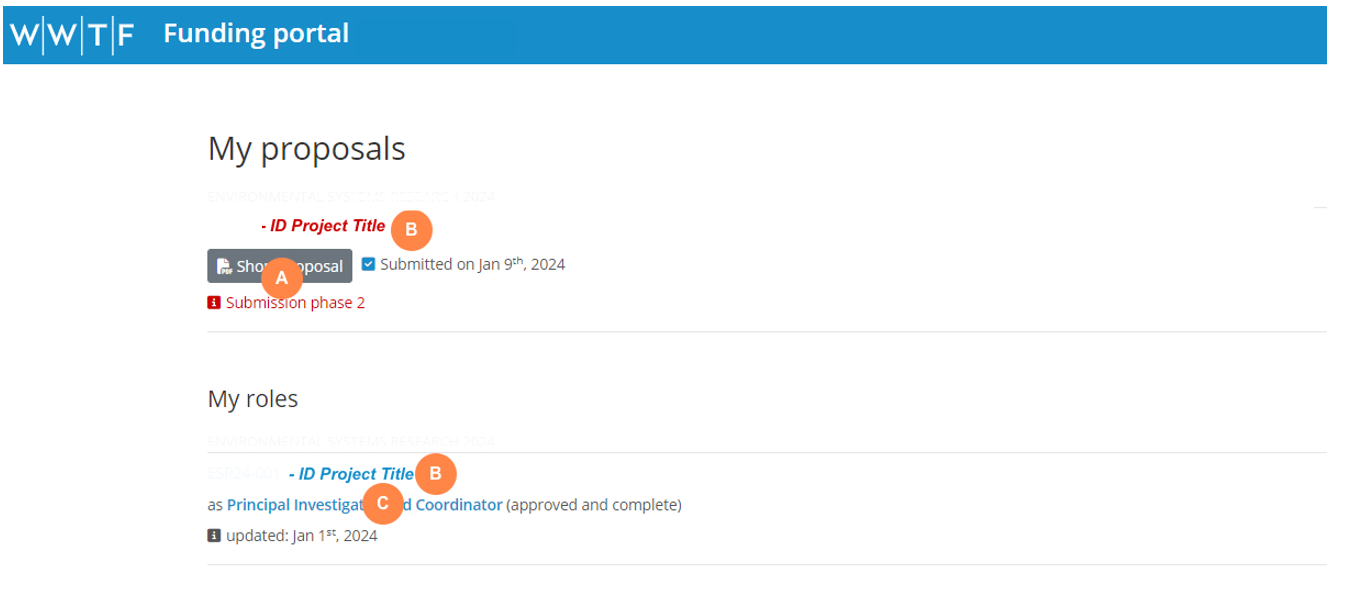
- A Click on “Short Proposal” to download a PDF of your submitted short proposal
- B Click on the project title to edit the full proposal
- C Click on your role to edit your specific role in this proposal
Update information about PIs
Contact details, CV, and information about your role in the project have been automatically transferred from the short proposal to the full proposal. Please ensure the information in the tab "My Profile" and "My Roles" is up-to-date. Only update information if required.
Step 1: Update your profile information if required
Upon login, go to “My Profile” in the top menu to update your profile. To update your CV, delete the previous document and upload a new CV as PDF. The requirements regarding the CV in the full proposal are the same as those in the short proposal . Please review these requirements here.
Step 2: Update information about your specific role in the proposal if relevant
Go to “My Proposal & Roles” in the top menu. Under “My Roles”, click on your role below the title of the proposal.
-
-
You can update the personal information by clicking on “Refresh from profile”. The system will check if there is new information in “My Profile” and update this section accordingly. Should you have uploaded a new CV in "My Profile", it will now be transferred to the full proposal.
-
The requirements regarding the description of your specific role in the full proposal are the same as those in the short proposal. Please review these requirements here.
-
Please note that the information entered here should be specific to the project. If you are participating in multiple proposals that require different subsets of your expertise, please tailor the information according to the project. Click here for further information on how to update your CV when participating in more than one project.
II. Proposal Chapters
General Information
The full proposal is comprised of six chapters, each under a separate tab:
- Basic Information
- Personnel and Institutions
- Project
- Budget
- Signatures
A chapter with a red alert symbol indicates that it is incomplete. Within the marked chapter, click on the red symbol(s) beside individual sections to highlight the fields requiring attention. A green checkmark indicates that the information in the chapter is complete.
Please note that the symbols might not refresh immediately even if the information in the chapter is complete. Changing to another chapter and going back to the other will refresh the symbol.
Chapter Basic Information
The name, acronym, nominated scientific disciplines, project duration and type of project (regular WWTF Project or Joint Project) can no longer be changed.
- Keywords: These will help the WWTF identify appropriate reviewers for your proposal. Keywords may still be edited or added.
- Suggested peer reviewers: Applicants must suggest five international peers whom they deem qualified to review the proposal. To enable the selection of a balanced set of reviewers, please provide keywords or phrases to describe the reviewers’ fields of expertise. Suggested reviewers must be based
- outside of Austria and
- have no conflict of interests with project applicants (complete team and collaborators). Persons with whom the project applicants have worked together (joint publications, research cooperations, etc.) in the last five years will not be considered.
- Please note that the WWTF will decide if suggested peers will be contacted for reviewing, and WWTF may take different reviewers to those you suggested. As a rule, WWTF will include a maximum of two reviewers suggested by the applicants. The other reviewers are suggested by the jury and/or WWTF office to avoid bias.
- Excluded peer reviewers: Applicants may, without stating any reasons, exclude up to three individuals from reviewing their proposal.
The names of the peer reviewers suggested and excluded by the applicants will be shared with the jury panel but not disclosed to potential reviewers themselves. Each proposal is reviewed by no less than three reviewers.
Chapter Personnel and Institutions
The addition, removal, or substitution of core team members (PI&C, co-PIs) are not permitted at this stage. WWTF may make exceptions in well-argued circumstances (e.g., a co-PI moving to an institution abroad or leaving the academic field).
Should well-justified changes in the core team be necessary, please contact WWTF. WWTF reserves the right to exclude projects from further evaluation in cases in which PIs can no longer be part of the project team.
Further partner institutions: Collaborating institutions beyond those of the core team members can be added in this stage. Please note that every person involved in the project must be linked to an institution in order to allow indication of time commitment and salary in the “Budget” section. A signature will be required from the authorizing persons at the core team members’ institutions and at all further partner institutions. A maximum of five different institutions (including those of the core team members) is permitted. Should a project be funded, the addition of further collaborations will be possible.
Chapter Project
This is the main section of the proposal that requires elaboration of the project’s scientific content.
Please note that the character limit includes spaces.
Lay summary (max. 1,200 characters)
Please provide a description of your proposed research in German that is suitable for the general public. This will primarily be used by WWTF for communicating your work to non-experts for fundraising and public relations purposes.
Scientific abstract (max. 2,000 characters)
Please provide a concise scientific abstract of the project. This will be used in approaching reviewers. The abstract has been taken automatically from the short proposal, but may be edited for the full proposal.
Work program (max. 14 pages)
Please use the template provided for download in the WWTF Funding Portal. Instructions on how to use the template are in a box directly in the template document. References are included in the 14 pages.
Ethical considerations (max. 1,000 characters)
If available, the ethical approval (final or preliminary) or confirmation of submission of an ethical approval should be submitted. If an ethical approval for the proposed work has yet not been granted, applicants must provide a timeline and an explanation of the feasibility of obtaining the necessary ethical approvals. In the latter case, applicants commit themselves to obtaining the required permits to commence the project in a timely manner, should it be selected for funding.
Upon selection for funding, submission of the final ethical approvals to WWTF is a prerequisite for the funding contract. As projects must start no later than 6 months after funding approval, grantees must ensure that ethical approvals are submitted to WWTF in time for the funding contract to be concluded.
Data management (max. 500 characters)
Please explain how you deal with the data in your project (sharing, accessibility, metadata, sustainability, ownership).
Use of generative AI (max. 500 characters)
Please describe if and how GenAI has been used in developing your research proposal.
WWTF recognizes that the use of genAI tools is pervasive and can facilitate proposal writing, for example in relation to improving written language. However, substantial use of genAI must be declared as such for the sake of transparency.
“Substantial use” is defined in line with the European Commission’s definition: “[…] using generative AI as a basic author support tool is not a substantial use. However, interpreting data analysis, carrying out a literature review, identifying research gaps, formulating research aims, developing hypotheses, etc. could have a substantial impact.” (EC 2024: Living Guidelines on the responsible use of generative AI in research.)
This mainly concerns critical parts of scientific relevance, such as hypothesis formulation and the scientific project plan. Applicants will be required to provide statements on the use of generative AIs at both the short and full proposal stages. WWTF emphasizes the importance of human responsibility for the content submitted at all stages of the application process.
WWTF does not allow the use of genAI in the evaluation process.
Please note that potential sex/gender aspects of the research topic and gender balance in the research team should be considered throughout the application (see here). These should be briefly described where appropriate in the relevant sections.
Budget
Please note the following guidelines for the budget:
- Maximum 15% difference between the budgets of the short and full proposals is permitted.
- Non-personnel costs should not exceed 30% of the total requested budget.
The budget table requires assigning a person to an institution in order to calculate the budget per institution. Therefore, please first add the institutions under “Personnel and Institutions.”
Personnel costs
- Core team members of the short proposal are automatically listed in the respective table.
- Click “Additional person” to individually add all persons who will work on the project. Please provide their name or select “is N.N.” if the role is to be filled (e.g., PhD candidate, Post Doc). Indicate the affiliation and staff category of each person using the dropdown menu. If an affiliation is not listed, return to the section “Personnel and Institutions” and add the respective institution. Each person must be assigned to an institution.
- Specify if the person will be financed by WWTF or contribute on an in-kind basis, and indicate their yearly time commitment to the project for each year (full time equivalents). A mixture of WWTF and in-kind financing is permitted.
- For persons financed by WWTF, enter the annual salary that corresponds to 100% annual gross costs in the first year of the project (employer and employee costs = gross costs / “Brutto-Brutto-Jahresgehalt”). Please note that PhD positions are often calcuated on a 75% employment basis. The total funding requested for each person will be automatically calculated.
- For personnel costs, an annual 3.5% p.a. increase in salary over the lifetime of the project has been pre-programmed. This is intended to assist with planning only, and actual salaries should be paid according to institutional or collective agreements. Please use baseline salaries according to the date you expect to start the project, that is 2027. Please contact your institutional research support services in this matter.
Non-personnel costs
- Add rows to provide a concise overview of all non-personnel costs directly related to the project. Please select the institution and cost category from the dropdown menus. If an affiliation is not listed, return to the section “Personnel and Institutions” and add the respective institution.
- Costs for basic infrastructure (rent, telephone) are not permitted. Costs for larger equipment essential for the project may only be requested on a pro rata basis that also takes into consideration the proportion of time that the equipment will be used for this project.
- WWTF strongly encourages open access publications. Costs for Article Processing Charges (APCs) may be requested.
- Costs for data management purposes (e.g., curation, storage) are eligible.
Budget per region
Cost overview
- Enter the overhead rate for each institution. WWTF permits a maximum of 20% overheads costs. Please consult each institutions’ research services to ensure compliance with all institutions’ internal regulations.
Explanation of Cost Planning (max. 2,500 characters)
- Please provide an explanation of cost planning principles, also indicating access to resources that are already available.
Disclosure of other applications for funding (max. 750 characters)
- If you have applied for funding for this project (or parts thereof) at other organisations, please indicate this here. This will not impact the evaluation of this proposal.
- Double submissions will be reviewed by the FWF. This means that the FWF will receive the list of projects and check whether a similar project has already been submitted to the FWF.
- WWTF does not allow double funding. If your proposal is selected for funding by both WWTF and another funding organisation, we will ask you to decide which funding you will accept.
Chapter Signatures
Submission of the proposal requires the signatures of the authorized person(s) at the host institutions of each of the PI&C and co-PIs (“Authorization”). For the full proposal, also signatures of further institutions added are required.
- Please consult your institutional research services regarding the person mandated to sign the proposals and plan sufficient time to obtain their signatures.
- Enter the name of each authorized person in the online form. This information will be included in the PDF to be signed. In case that the institution has applied before, the system suggests already a signing person. Please check if this is still the person authorized to sign. You can overwrite the suggested entry manually.
- Download the PDF using the link “You can generate the signature sheet here”.
- Signatures may be provided in various formats
- Add a scanned or physical signature, and upload the form; or
- Insert an electronic signature (e.g., A-Trust, Handysignatur) and upload the form. Please note that electronically signed PDFs cannot be merged into a single document.
Please note that signatures do not have to be on the same sheet. The upload of multiple signature files is possible.
Please ensure signatures are dated. Undated signatures will not be accepted.
No comments to display
No comments to display