# ICT25 / Login and go to your proposal
**About the Funding Portal**
- All entries are saved automatically. In case a “Save” button is not visible, please be assured that your data will have automatically been saved.
- The system constantly validates and saves data in background. If it appears that your entries have not been accepted, please refresh the website. This should resolve the problem and might help when encountering other issues with the system
- WWTF aims to expand the system’s features in due time to streamline the online application process. We ask for your patience if not all potential features are ready at this point in time.
- All core team members (i.e., coordinating PI and co-PIs) can contribute to and edit the proposal before its submission. However, only one person can edit the proposal in the Funding Portal at any time.
Please note that only the coordinating PI (PI&C) can submit the proposal.
**Login and go to your proposal**
1. Go to [https://fundingportal.wwtf.at/](https://fundingportal.wwtf.at/)
2. Login with your credentials
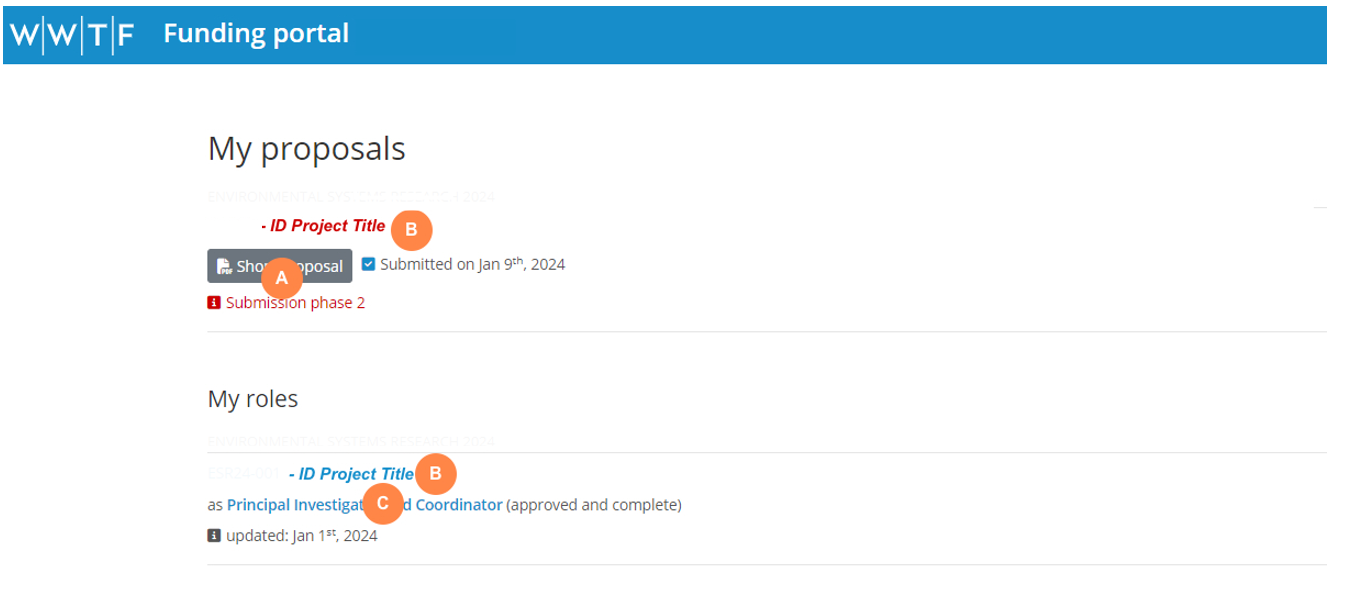
3. You will see an overview of your proposal(s) and role(s) under the menu “My Proposals & Roles"
[](https://wiki.wwtf.at/uploads/images/gallery/2025-03/nWDDNxOkZZEGybZW-image.png)
- **A **Click on “Short Proposal” to download a PDF of your submitted short proposal in case you need to return to the information in the short proposal.
- **B **Click on the project title to edit the full proposal
- **C** Click on your role to edit your specific role in this proposal